No tool offers absolute protection, but a VPN dramatically hardens your defenses. It encrypts your traffic, hides your IP address, and blocks most third-party tracking—making you far safer than browsing without one. Pair it with strong passwords and timely software updates to stay ahead of attackers.
What is VPN and How It Works [Ultimate Guide]
Written by: Jack Davis, Cybersecurity Analyst | Last Updated: November 6, 2025
Remember the last time you checked your bank account on public Wi-Fi? Every time you connect to the internet, you leave digital breadcrumbs that companies, hackers, and even your internet service provider can follow.
In 2025, our lives are more connected than ever, but so are the risks. According to the FBI's 2024 Internet Crime Report.
Americans lost $16.6 billion to cybercrime, marking a 33% increase from 2023. Your personal data is constantly tracked, collected, and sometimes sold to the highest bidder.
In this guide, you'll learn:
- What a VPN is and how it works
- Why you need one in 2025
- How to choose the right VPN service
- Real-world VPN use cases
- Common myths debunked
What Is a VPN? (Simple Explanation)
A VPN (Virtual Private Network) is a privacy tool that creates a secure, encrypted connection between your device and the internet. Think of it as a private tunnel that hides your online activity from prying eyes.
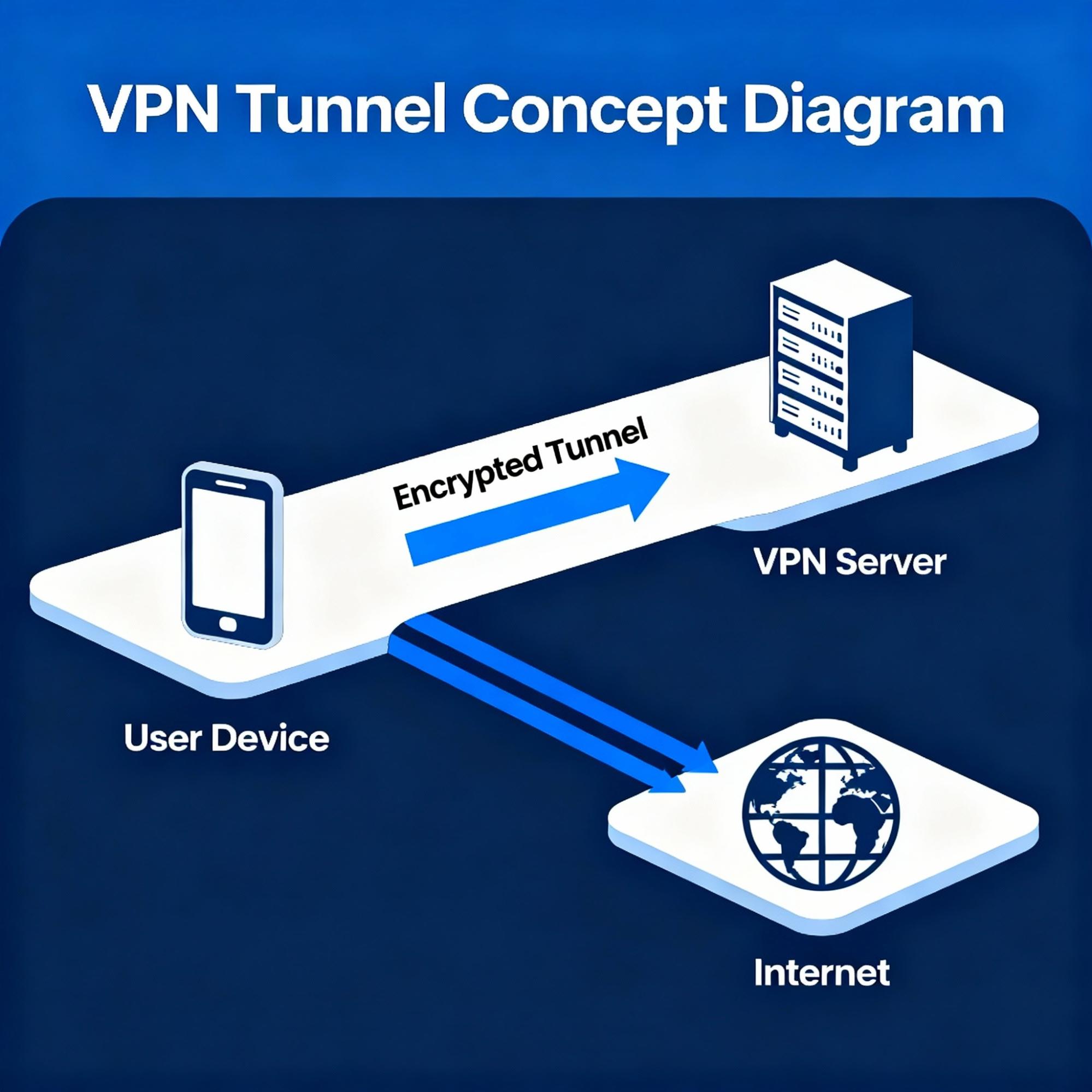
How It Works in 3 Steps
- EncryptionYour data is scrambled into unreadable code using military-grade encryption.
- IP MaskingYour real IP address is hidden and replaced with the VPN server's IP.
- Secure RoutingAll traffic passes through an encrypted tunnel to the VPN server, then to your destination.
Without a VPN: Your ISP sees every website you visit, your location is exposed, and hackers on public networks can intercept your data, according to cybersecurity research on public Wi-Fi risks.
Why Do You Need a VPN Service?
In today's times, one thing is clear that privacy online isn’t what it used to be, and protecting your digital footprint isn’t a luxury but a necessity.
The Data Economy You Didn’t Sign Up For
Here is the thing, most people don't even realise how much of their data is collected every day, your personal information fuels a trillion-dollar data economy. A VPN stops that data pipeline at its source by encrypting your traffic and masking your IP. It prevents anyone, including your Internet Service Provider (ISP), from profiling or monetizing your activity.
Freedom to Browse Without Borders
Various streaming platforms, streaming platforms, news outlets, and even social media content vary depending on where you log in.
Protecting Yourself in the Age of AI and Big Data
As scary as it sounds, AI-driven algorithms analyze how you type, shop, and even move your mouse. Many data brokers create predictive profiles that know your habits better than you do. VPN services break this tracking chain.
Increasing Cybercrime and Identity Theft
According to the FBI’s Internet Crime Report (2025), online fraud and identity theft remain among the top reported crimes, costing Americans billions each year. Many of these attacks begin with unsecured connections, which people use every day without thinking twice.
Whether you’re a student streaming from a dorm in Boston, a freelancer working from Los Angeles, or a traveler using airport Wi-Fi in New York, the internet sees you.
But with a VPN, you decide what’s visible and what’s private. You don’t need a VPN because you’re hiding something,g but need it because your data deserves respect.
What Does a VPN Do? Everyday Uses Explained
So what exactly happens when you connect to a VPN? Think of it as mailing a letter through a trusted middleman who removes your return address before delivering it. The message still reaches its destination, but your identity remains private.
1. Protecting You on Public Wi-Fi
Whether you are working from an airport in Chicago or grabbing coffee at a Los Angeles cafe, free public Wi-Fi networks are convenient but also among the easiest targets for hackers. According to Norton’s 2025 Consumer Cyber Safety Report, over 48% of Americans use public Wi-Fi weekly, and nearly 37% have experienced at least one cyber threat while connected. A VPN helps to:
- Encrypt your traffic, making it unreadable to anyone snooping on the same network.
- Protect your data, including passwords, credit card details, and emails.
2. Hiding Your Online Identity
Every time you browse, stream, or search, your ISP can see where you go, and in some countries, ISPs are legally allowed to sell anonymous browsing data to advertisers. A VPN masks your IP address and decouples your identity from your activity. It prevents advertisers, ISPs, and data trackers from profiling your online behavior—meaning fewer targeted ads, more control over your privacy, and an internet experience that’s truly yours.
3. Bypassing Geo-Restrictions and Censorship
We have all been there, trying to stream a favorite show on Netflix while traveling abroad only to find it unavailable. According to Statista (2025), 43% of VPN users cite streaming access as a primary reason for using one. A VPN allows you to:
- Connect through servers in other countries.
- Access content from around the globe without restrictions.
4. Securing Remote Work and Business Data
Remote work has become the norm in 2025, and VPNs are essential for professionals logging into company systems from home or on the road. They ensure that business emails, project files, and cloud systems are accessed through encrypted connections and not open networks. Many U.S. companies are integrating VPNs into their cybersecurity policies, with over 78% of small and medium businesses using VPNs to safeguard remote operations.
5. Avoiding Bandwidth Throttling
Have you felt your internet slowing down when streaming or gaming? You have likely been throttled. ISPs sometimes reduce speeds for certain activities to manage traffic. A VPN hides your online activity, making it difficult for ISPs to selectively throttle your bandwidth. The result is smoother streaming, lag-free gaming, and a more consistent connection, whether you’re playing in Austin or binge-watching in Seattle.
6. Enhancing Online Shopping Privacy
Online retailers use different pricing based on location, browsing habits, or even device type. With a VPN, you can browse from different regions and compare prices more fairly, helping you secure the best deals on flights, hotels, or software subscriptions.
How Does a VPN Work? (Technical Breakdown)
Understanding VPN technology helps you appreciate how it protects you:
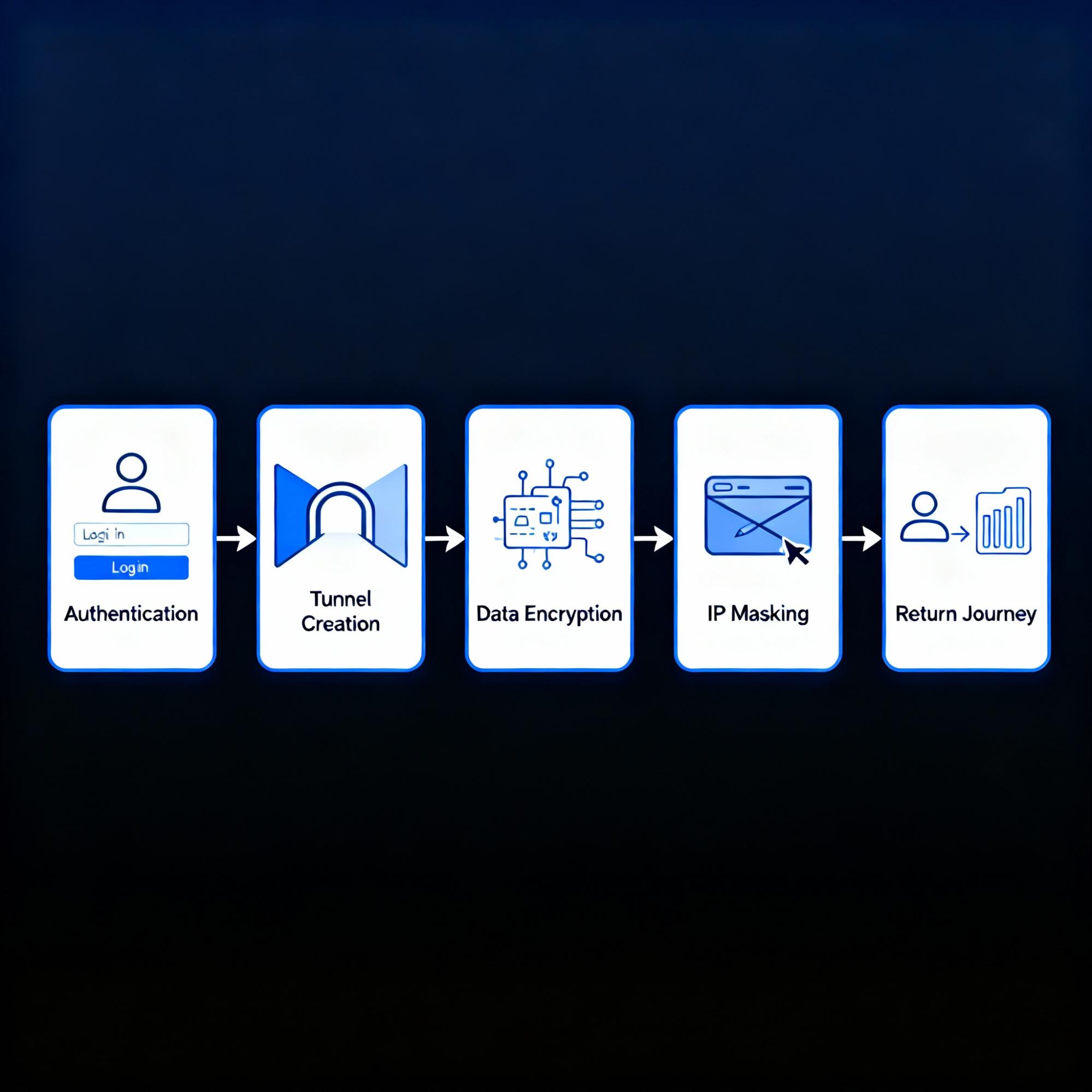
Step 1: Authentication
When you launch your VPN app and select a server, your device sends credentials to verify your identity. This establishes trust between your device and the VPN server.
Step 2: Creating the Encrypted Tunnel
The VPN client and server negotiate encryption protocols and establish a secure pathway for data flow. This happens in milliseconds.
Step 3: Encrypting Your Data
Every action leaving your device—searches, emails, video streams—is converted into ciphertext using advanced encryption. Even if intercepted, the data is unreadable without the encryption key.
Step 4: Hiding Your Identity
The encrypted data travels to the VPN server, which forwards your request to the destination website. To the website, the request comes from the VPN server's IP, not yours, hiding your location and identity.
Step 5: The Return Journey
The website's response returns to the VPN server, gets encrypted again, and travels back through the secure tunnel to your device.
Understanding VPN Protocols
VPN protocols determine how fast, secure, and stable your connection will be. Here's what you need to know:
Modern protocols offer exceptional speed with just 4,000 lines of code (compared to OpenVPN's 70,000+), delivering 15% less data usage per session.
OpenVPN remains the proven veteran with military-grade AES-256 encryption, as detailed in Contabo's deep-dive comparison, while IKEv2/IPsec excels for mobile users who switch between networks frequently.
Learn more: For a detailed comparison of encryption methods, security features, and performance benchmarks.
Types of VPN Services
Different VPN types serve different needs:
1. Remote Access VPN (Most Common for Individuals)
A remote VPN lets individual users securely connect to a private network—like their home or workplace—over the internet. It's great for travelers, freelancers, and remote workers who need to access sensitive files or browse safely on public Wi-Fi.
Best for: Personal use, small businesses, travelers, remote employees.
2. Site-to-Site VPN (Best for Businesses)
This type connects entire networks and is often used by companies across cities or countries. It forms a virtual bridge between two networks and allows teams to securely share data and resources.
3. Mobile VPN (For On-the-Go Protection)
Ideal for individuals who travel frequently or are always on the go. It keeps the connection stable even when you move between networks, such as switching from Wi-Fi to mobile data.
4. Cloud VPN (For Businesses Using Cloud Infrastructure)
A cloud VPN provides secure access to cloud resources like AWS, Google Cloud, or Microsoft Azure. As businesses move their data and apps to the cloud, this VPN type ensures secure, encrypted access for remote teams.
5. Peer-to-Peer (P2P) VPN
Designed for users who share files directly, such as torrents. It optimizes bandwidth and security while maintaining privacy. Unlike regular networks, it doesn’t log your activity or expose your IP to other peers.
How to Choose the Right VPN: Your Checklist
With hundreds of options available, use these criteria to find a trustworthy VPN:
✓ Verified No-Logs Policy
The VPN should not collect, track, or store your browsing history, IP address, or online activity. Look for third-party audits that verify these claims.
✓ Strong Encryption Standards
Demand AES-256-bit encryption—the same standard used by banks and governments. Avoid VPNs using outdated protocols like PPTP.
✓ Wide Server Coverage
More servers mean less congestion and faster speeds. Look for providers with servers in locations you need (both domestic and international).
✓ Fast Performance
Modern VPNs use optimized servers and lightweight protocols maintain high speeds. Free VPNs often overload servers, causing slowdowns—even though 30% of users rely on free VPNs despite performance and security risks.
✓ Multi-Device Support
Your VPN should work on Windows, Mac, iOS, Android, and allow multiple simultaneous connections so you can protect all your devices.
✓ Kill Switch Feature
If your VPN connection drops, a kill switch instantly cuts your internet to prevent unencrypted data leaks.
✓ Transparent Pricing
Clear subscription plans, no hidden fees, and a money-back guarantee. Avoid VPNs that hide terms in fine print.
✓ Independent Security Audits
Top-tier VPNs undergo third-party audits to verify their privacy claims and security infrastructure.
Industry Benchmarks
Key metrics to understand the current VPN landscape:
- Server NetworksTop providers offer coverage in 60–100+ countries with thousands of servers globally.
- Security FeaturesAES-256 encryption, kill switches, DNS leak protection, and split tunneling are now standard offerings.
- Speed PerformanceModern protocols like WireGuard deliver minimal speed loss (5–15%).
- Pricing RangePremium VPNs typically cost $3–$12 per month, depending on the subscription length.
- Market LeadersMarket leaders ranks NordVPN at 17% market share, with ProtonVPN and ExpressVPN as other trusted leaders.
- Payment ModelsResearch shows 64% of VPN users maintain paid subscriptions—26% pay personally, 25% via organizations, and 13% share costs.
How to Use a VPN (Beginner's Guide)
Setting up a VPN is simpler than you think:
- Step 1: Download the AppVisit your chosen VPN's official website or app store. Never download from third-party sites to avoid malware.
- Step 2: Install and Log InInstall the app and enter your credentials. Enable auto-start so your VPN launches automatically.
- Step 3: Choose a ServerFor best speed, select a nearby server. For content access, choose a server in the content's region. For privacy, any secure server works—your IP will be hidden regardless.
- Step 4: Click "Connect"Hit connect and wait a few seconds. You'll see a confirmation when the encrypted tunnel is active.
- Step 5: Browse FreelyYour connection is now protected. Use public Wi-Fi, stream content, or handle sensitive tasks knowing your data is encrypted.
Are VPNs Safe? Myths vs. Facts
Let's clear up common misconceptions:
Myth 1: "All VPNs Are Equally Safe"
Fact: Quality varies dramatically. Free VPNs often make money by selling user data or injecting ads. Security.org's research shows 30% of users rely on free VPNs despite documented security risks. Always choose providers with verified no-logs policies and independent audits.
Myth 2: "VPNs Make You Completely Anonymous"
Fact: VPNs hide your IP and encrypt your data, but they don't make you invisible. Websites can still use cookies, browser fingerprints, or login credentials to identify you. For maximum privacy, combine your VPN with privacy-focused browsers and tracker blockers.
Myth 3: "VPNs Are Only for Tech Experts"
Fact: Modern VPNs are designed for everyone and require just one click to connect. You don't need technical knowledge to stay protected.
Myth 4: "VPNs Are Illegal"
Fact: VPNs are 100% legal in the United States, Canada, the UK, and most countries. They're legitimate privacy tools used by corporations, journalists, and everyday users to protect confidential data.
Myth 5: "VPNs Always Slow Down Your Internet"
Fact: VPN minimizes speed loss to 5-15%. Premium VPNs invest in high-bandwidth infrastructure to maintain fast performance.
V3VPN: A Solution Built for Modern Needs
When choosing a VPN, you need a service that balances security, speed, and affordability. V3VPN is designed with these priorities in mind:
- Edge-Optimized PerformanceOur architecture reduces server distance by up to 40%, delivering faster speeds for streaming, gaming, and remote work.
- Smart Protocol SelectionV3VPN automatically switches between WireGuard and OpenVPN based on your activity—no manual configuration needed.
- Zero-Logs, Zero RetentionWe operate RAM-only servers, meaning your activity data is never stored, shared, or sold.
- Affordable ProtectionStarting at just $4.99/month with a free plan available, V3VPN offers premium features without premium prices.
- Real-Time Threat MonitoringOur AI-powered system blocks malicious connections before they reach your device.
- Cross-Platform CoverageProtect all your devices—Windows, Mac, iOS, Android—with unlimited simultaneous connections.
Whether you're securing business data, streaming content, or simply browsing safely on public Wi-Fi, V3VPN provides the protection you need without complexity.
Start your free V3VPN trial todaySupport
Frequently Asked Questions
Answers to the most common questions about staying private online and making the most of v3vpn.
Conclusion
Americans lost $16.6 billion to cybercrime, and cybercriminals filed 859,532 complaints with the FBI. Protecting your digital identity isn't optional—it's essential.
A Virtual Private Network is your first line of defense against data tracking, identity theft, and privacy invasion. It encrypts your connection, hides your online activity, and restores your right to browse the internet freely and safely. The risks are real: Investment fraud costs victims $6.57 billion in 2024, public Wi-Fi attacks compromised 25% of café users, and ISPs continue tracking and selling browsing data., The solution is accessible: Modern VPNs like V3VPN offer military-grade encryption, verified no-logs policies, and user-friendly interfaces that anyone can use. Don't wait for a security breach to take action. Whether you're working remotely, streaming content, or simply checking email on public Wi-Fi, a VPN keeps you protected.
Your privacy matters. Protect it today.
Get started with V3VPN and secure your digital life →